Play 3D Chess Online Free
More Games to Play









About 3D Chess
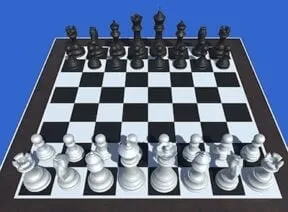
3D Chess is a complete chess game rendered on a three-dimensional board, with four computer difficulty levels and a two-player mode for playing someone across the table. The rules are full standard chess — castling, en passant, promotion and all.
The 3D board is a matter of taste; some players read a perspective board more naturally, others prefer flat. What matters is underneath: the difficulty levels are graded well enough that a beginner has somewhere to start and an experienced player still has to think at the top setting.
How to play 3D Chess
- Move a piece
- Click it, then the destination square
- Touch
- Tap the piece, then the square
- Difficulty
- Choose level 1–4 before starting
- Two players
- Select the 2-player mode
- Pick two-player, or a computer difficulty from level 1 (easiest) to 4.
- White moves first; click a piece and then its destination.
- Standard chess rules apply throughout, including castling and promotion.
- Checkmate the opposing king to win.
3D Chess tips
- Control the centre in the opening — the four central squares are worth more than material early.
- Develop knights and bishops before moving the same piece twice.
- Castle early to get the king safe and the rook into play.
- At the higher difficulty levels, don't grab a free pawn without checking what it opens up.
3D Chess — questions
Can you play two-player chess on one computer?
Yes — the two-player mode shares one board and screen, with each player using the mouse in turn.
How hard is the computer?
There are four levels. Level 1 is designed for beginners and level 4 will punish casual mistakes, which is a reasonable range for a browser game.
Does 3D Chess work on a phone?
Yes — tap a piece then its destination. Nothing to install.
- Categories
- Puzzle
- Platform
- Web browser — desktop, mobile, and Chromebook
- Cost
- Free, no download or sign-up