Play Google Doodle Rubik’s Cube Online Free
More Games to Play











About Google Doodle Rubik’s Cube
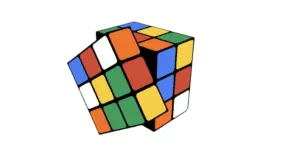
Google made this doodle for the Rubik's Cube's 40th anniversary in 2014: a fully interactive 3D cube you scramble and solve with the mouse, dragging faces to turn them and the background to rotate your view.
It's a proper implementation rather than a novelty — the cube behaves exactly as a physical one does, which means everything you learn here transfers to a real cube in your hands.
How to play Google Doodle Rubik’s Cube
- Turn a face
- Click and drag on that face
- Rotate the cube
- Drag the background
- Scramble / reset
- The buttons on screen
- Scramble the cube to begin.
- Drag a face to turn it; drag outside the cube to look around.
- Solve layer by layer: white cross, white corners, middle layer, then the yellow face.
- A timer records how long you take.
Google Doodle Rubik’s Cube tips
- Learn the beginner's layer-by-layer method; speed methods only make sense once you can solve it at all.
- The white cross is intuitive — solve it without algorithms.
- The middle-layer algorithm and its mirror get you most of the way.
- Keep the same face toward you rather than reaching around the cube.
Google Doodle Rubik’s Cube — questions
How do you solve a Rubik's Cube?
The beginner's method solves it in layers — white cross, white corners, middle layer, yellow cross, then orienting and permuting the last layer — and needs about five algorithms in total.
Why did Google make a Rubik's Cube doodle?
For the puzzle's 40th anniversary in 2014. It was one of the more technically ambitious doodles, implementing a fully interactive 3D cube in the browser.
Does it work on a phone?
Yes — drag a face to turn it, though a mouse is easier for precise turns.
- Categories
- Casual & Hyper-Casual
- Platform
- Web browser — desktop, mobile, and Chromebook
- Cost
- Free, no download or sign-up