Play Piano Online Free
More Games to Play









About Piano
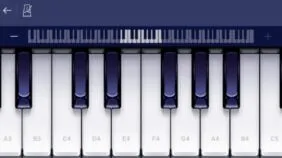
This is a playable piano in the browser: a full keyboard laid out on screen, mapped to your computer's keys so that a row of letters becomes a row of notes. Click with the mouse or type to play.
It's genuinely useful as well as fun — for working out a melody you have in your head, checking a chord, or learning where notes sit relative to each other without owning an instrument. Many versions include sheet-music sequences you can follow along with.
How to play Piano
- Play a note
- Press the mapped letter key, or click a key
- Sharps and flats
- The number row above the letters
- Octave
- The octave shift controls
- Sustain
- Hold shift or the sustain toggle, where offered
- Each computer key maps to a piano key — the mapping is shown on the keys themselves.
- Press or click to play notes.
- Use the number row for sharps and flats.
- Shift octaves to reach higher or lower notes.
Piano tips
- Learn one octave's mapping first; the rest repeats the pattern.
- Chords work — press two or three keys at once.
- Use sustain for anything slow; without it every note stops dead.
- Slow a piece right down before trying it at tempo.
Piano — questions
Can you play chords on a virtual piano?
Yes — hold two or three mapped keys at once. Most browser pianos handle several simultaneous notes, though very large chords can hit keyboard limits on some hardware.
Which keys play which notes?
The letter rows map to the white keys and the number row to the black keys, with the mapping printed on the on-screen keyboard. It repeats per octave, so learning one octave covers the instrument.
Does it work on a Chromebook?
Yes — it runs in the browser with nothing to install, using the Chromebook's own keyboard.
- Categories
- Casual & Hyper-Casual
- Platform
- Web browser — desktop, mobile, and Chromebook
- Cost
- Free, no download or sign-up