Play Google Gravity Online Free
More Games to Play








About Google Gravity
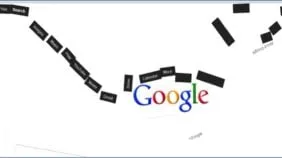
Google Gravity is one of the oldest Google tricks and one of the most satisfying: the Google homepage loads normally, and then the logo, the search box and every button drop to the bottom of the window and pile up. You can pick them up with the mouse and throw them, and — the best part — typing a search still works, with the results falling into the heap.
It was made by Ricardo Cabello (Mr.doob) in 2009 as a Chrome Experiment showing off what browsers could do with physics, and it has never stopped being shared. It isn't on google.com itself; people search 'google gravity' expecting it to be, which is why it's here, running exactly as it always has.
How to play Google Gravity
- Drag
- Click and hold a piece, move the mouse
- Throw
- Release while moving
- Search
- Type a query and press Enter — results fall in
- Wait a moment after the page loads; everything falls.
- Grab any element with the mouse and drag it. Let go with motion to throw it.
- Type a search and press Enter. The results drop in as more physics objects.
- There is no goal; it is a toy. Reload to reset the pile.
Google Gravity tips
- Throw the logo at the pile — the pieces knock each other around convincingly.
- Search for something with many results to fill the window with debris.
- Resize the browser window: the pieces re-settle.
- The related tricks — 'do a barrel roll', 'askew', the Thanos snap — are on our Google Games hub.
Google Gravity — questions
Is Google Gravity a real Google feature?
No. It is a Chrome Experiment made by Mr.doob in 2009 that recreates the Google homepage with physics. Searching 'google gravity' on Google returns links to it; it doesn't happen on google.com itself.
Does search actually work in Google Gravity?
Yes — type a query and press Enter and real results fall into the pile. It is the part that made the experiment famous.
Does Google Gravity work on a phone?
It is built for a mouse. On a touchscreen you can tap and drag pieces, but the throwing feels better with a mouse or trackpad.
- Categories
- Casual & Hyper-Casual
- Platform
- Web browser — desktop, mobile, and Chromebook
- Cost
- Free, no download or sign-up